
RAM Tough-Bar for Overlanding: Vehicle Mounting Solutions for Off-Road Adventures
Overlanding takes drivers beyond paved roads and into remote areas where navigation, communication, and access to digital information become essential. Whether you’re following trail maps, checking GPS coordinates, coordinating with other vehicles, or organizing equipment inside your 4×4, a well-planned in-vehicle setup can make a difference.
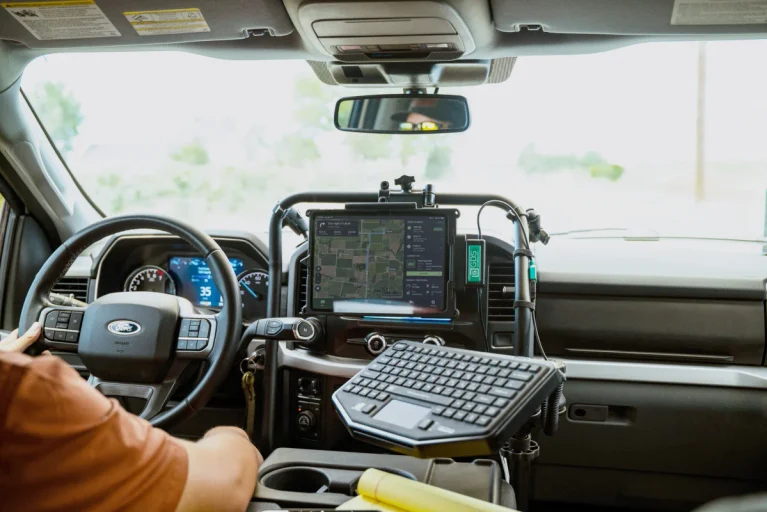
A suitable overlanding tablet mount gives a compatible device a dedicated position and helps keep navigation screens and other equipment organized inside the vehicle. If you want a vehicle-specific mounting platform, RAM® Tough-Bar™ offers custom-bent solutions that match the dashboard and interior configurations of supported vehicles.
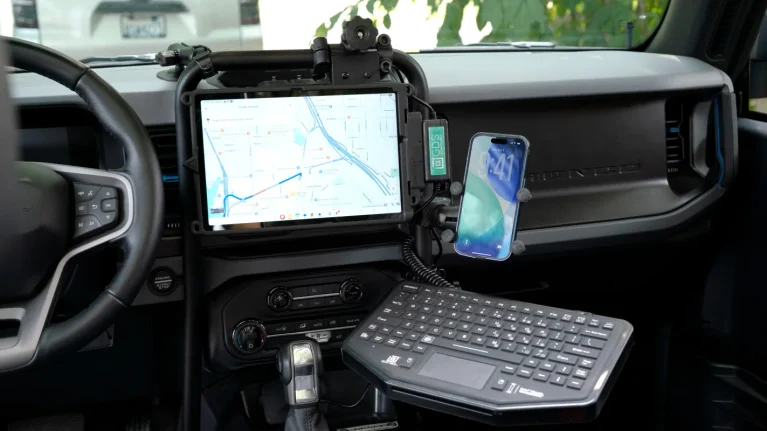
For example, the RAM-TB-7 offers a vehicle-specific Tough-Bar™ option for selected Ford Bronco configurations. It provides a foundation for compatible devices and helps organize navigation and communication equipment without relying on several unrelated mounting locations.
RAM also offers other Tough-Bar™ models for selected vehicles, including Toyota Tacoma and Toyota 4Runner configurations. However, each product has its own fitment requirements.
In this guide, we’ll explore how RAM® Tough-Bar™ supports overlanding setups, how compatible components help organize tablets and phones, and what to consider when choosing a vehicle-specific mounting solution for off-road adventures.
What Is RAM® Tough-Bar™?
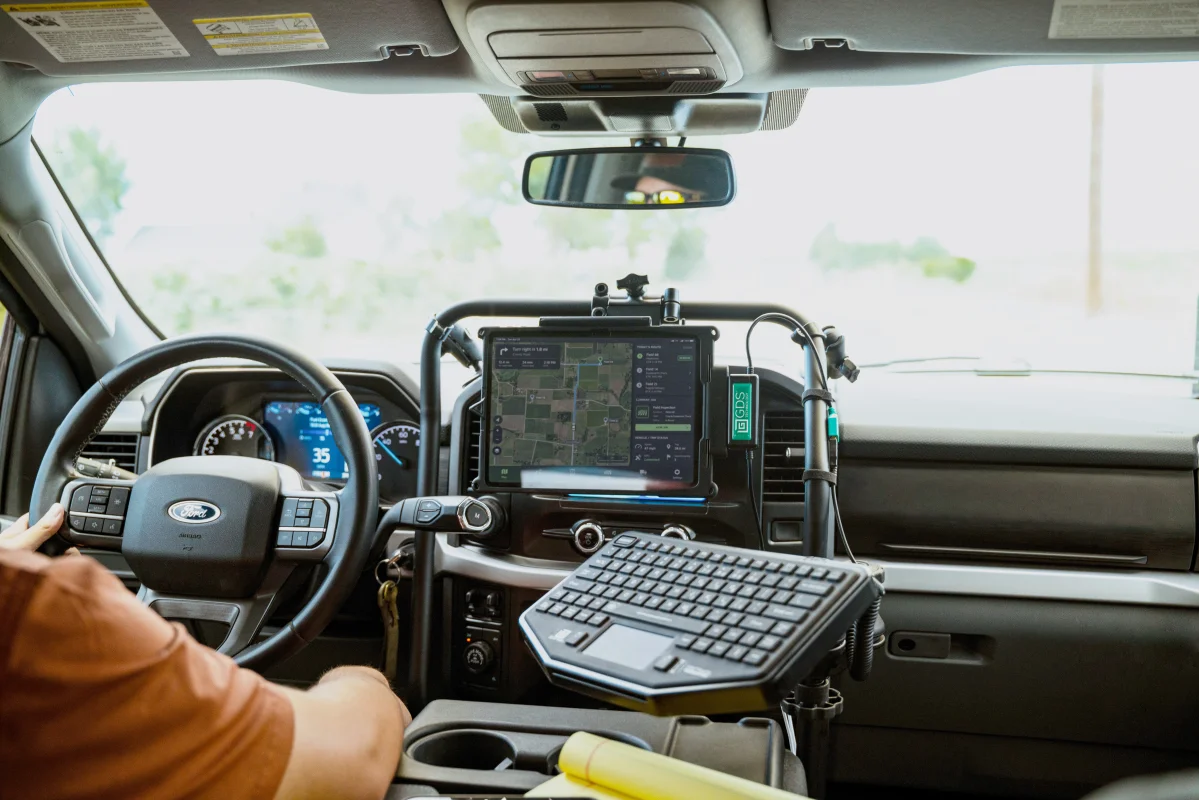
RAM® Tough-Bar™ is a custom-bent vehicle mounting bar that follows the dashboard and interior configuration of specified vehicles.
It provides a dedicated mounting platform for compatible in-cab devices. Instead of using several unrelated mounting locations, you can build your setup around one shared foundation and add compatible RAM® mounting components.
Depending on the individual product, RAM® Tough-Bar™ models may offer:
- Vehicle-specific design: RAM custom-bends each applicable model to match the dashboard and interior configuration of supported vehicles.
- Three-point attachment: Applicable models connect at the driver seat bolt, passenger seat bolt, and center dashboard.
- Modular mounting: You can add compatible RAM® rail bases and mounting components.
- Configurable device arrangements: You can build a setup for different compatible in-cab devices with the appropriate accessories.
- Interior-conscious positioning: Applicable designs provide a mounting location while helping preserve passenger space.
The exact mounting points, hardware, installation options, and compatibility vary by Tough-Bar™ part number. Always check the manufacturer’s fitment information for your vehicle before choosing a product.
Why Device Mounting Matters for Overlanding
Overlanding trips can involve long driving distances, changing terrain, unfamiliar routes, and extended time away from regular services. Drivers may rely on several electronic devices to plan routes, navigate, communicate, and document their journeys.
A well-planned in-vehicle mounting arrangement helps keep these devices organized and accessible.
1. Easier Access to Navigation Information
A mounted phone or tablet gives compatible navigation applications a dedicated screen location.
This arrangement can help when you review routes, maps, waypoints, and trip information while the vehicle sits stationary or when screen viewing is otherwise safe and permitted.
2. Better Organization Inside the Vehicle
Overlanding vehicles often carry recovery equipment, camping supplies, communication devices, and other accessories.
A dedicated mounting platform helps keep electronic equipment organized instead of leaving devices loose on seats or across the dashboard.
3. Multiple-Device Configurations
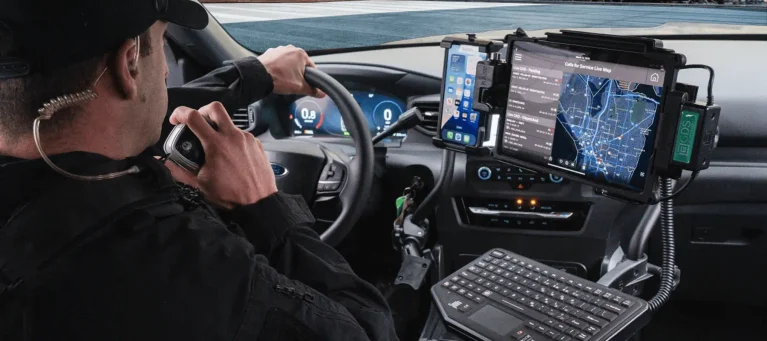
Some overlanding setups use more than one device, such as a phone, tablet, GPS unit, or communication equipment.
A modular mounting system can organize compatible devices in a shared in-cab arrangement, depending on the vehicle and the accessories you select.
4. More Deliberate Device Positioning
Screen position matters when you drive on unfamiliar routes. A suitable mounting arrangement helps position devices without obstructing the driver’s view or interfering with vehicle controls.
Always review maps and make route changes when safely stopped.
Using a Tablet for Overlanding Navigation
A tablet can help you view larger maps, plan routes, and review trip information. Its larger screen may also make some mapping interfaces easier to view when the vehicle sits stationary.
Choose an off-road tablet mount according to your tablet’s dimensions, weight, case, and intended mounting position.
1. Trail Maps and Route Planning
Overlanders often use mapping applications to review trail routes, identify waypoints, and plan stops.
A tablet in a suitable mounting position gives you a convenient screen for reviewing this information when parked.
2. Offline Navigation Preparation
Remote areas may have limited or no mobile network coverage. Before travelling, download the required maps and route information through an application that supports offline access.
Keep in mind that a mounted tablet does not automatically provide GPS reception or offline mapping. Those capabilities depend on your device, software, location services, and preparation.
3. Larger-Screen Route Viewing
A larger display can make it easier to review map details, route alternatives, and trip information when parked.
Choose a compatible holder that supports your tablet’s size and weight. Also, check that the screen position suits your vehicle’s interior.
4. Device Positioning and Visibility
Position the tablet so it does not block the driver’s view, interfere with vehicle controls, or create a distraction.
Review maps and make route changes while stopped in a safe location.
Phone and GPS Mounting for Off-Road Adventures
Tablets aren’t the only devices that overlanders use. Smartphones and dedicated GPS devices can also support navigation and trip coordination.
RAM® offers mounting components for different device types. The right holder and base depend on your device and the mounting location inside your vehicle.
1. Smartphone Mounting
You can use a phone for navigation applications, communication, trip information, and other compatible tools.
A compatible phone holder gives your device a dedicated position inside the vehicle. It also helps prevent the phone from lying loose on the dashboard or passenger seat.
2. Dedicated GPS Devices
Some overlanders prefer dedicated GPS devices for route guidance and location information.
Choose a holder that works with your specific GPS model. Check the device dimensions and mounting requirements before selecting a component.
3. Multiple Navigation Devices
Some drivers use a phone as a backup navigation device alongside a tablet or dedicated GPS unit.
A configurable mounting arrangement can help organize these devices, provided the vehicle and mounting components support your chosen configuration.
For every device, confirm holder compatibility. Position the equipment so it does not obstruct visibility or essential controls.
How RAM® Tough-Bar™ Helps Organize a Ford Bronco Interior
The Ford Bronco appeals to many drivers who enjoy off-road and overlanding adventures. Bronco owners may use their vehicles for trail navigation, communication, route planning, and carrying equipment on extended journeys.
RAM-TB-7 offers a vehicle-specific RAM® Tough-Bar™ option for specified Ford Bronco configurations.
Its custom-bent design provides a dedicated mounting foundation inside the vehicle. You can add compatible RAM® components to position supported devices according to your requirements.
1. A Dedicated Mounting Foundation
The RAM-TB-7 gives you a vehicle-specific mounting platform instead of several unrelated mounting locations.
You can select compatible mounting components for the devices you plan to use during an overlanding trip.
2. Navigation and Trail Information
A compatible tablet or phone holder gives navigation devices a designated position.
This arrangement helps organize access to trail maps, route information, and other trip-related applications when you park the vehicle safely.
3. Communication Equipment
Overlanding groups may use phones and other communication devices to coordinate travel and share information.
You can add compatible holders to the mounting arrangement, depending on the device and the accessories you select.
4. A More Organized Cabin
A well-planned device arrangement helps reduce loose electronic equipment around the dashboard and seats.
When choosing components, consider passenger space, screen position, available mounting locations, and access to vehicle controls.
5. Check Vehicle-Specific Fitment
RAM-TB-7 targets specified Ford Bronco configurations. Check the product-specific RAM® listing for exact model-year and installation compatibility before purchasing.
Do not assume that this product fits every Bronco trim or model year.
How RAM® Tough-Bar™ Supports a More Organized 4×4 Interior
A well-organized vehicle interior can prove especially useful when you equip a 4×4 for longer journeys.
RAM® Tough-Bar™ provides a vehicle-specific mounting foundation for compatible devices. On applicable models, its three-point attachment arrangement connects at the driver seat bolt, passenger seat bolt, and center dashboard.
This design provides a stable mounting platform and helps minimize device movement.
1. Dedicated Mounting Locations
A Tough-Bar™ gives compatible components a shared mounting foundation. You don’t need to position each device independently.
2. Modular Mounting Options
You can add compatible RAM® rail bases and accessories to build a setup around each device and its intended position.
3. Passenger Space Considerations
Some Tough-Bar™ models feature a low-profile design that helps preserve passenger legroom.
The available space depends on your vehicle and the completed mounting configuration.
4. Vehicle-Specific Installation
Different 4×4 vehicles have different dashboard shapes, seat-bolt locations, display sizes, and interior layouts.
RAM designs Tough-Bar™ part numbers around specified vehicle configurations, so you must choose the correct fitment.
Three-Point Attachment and Mounting Stability
Applicable RAM® Tough-Bar™ products use a three-point attachment arrangement:
- Driver seat bolt.
- Passenger seat bolt.
- Center dashboard.
These attachment points create the mounting foundation that RAM® describes for the relevant vehicle configurations.
RAM’s design aims to minimize device vibration and movement, including in rugged driving conditions. However, the complete setup’s performance also depends on the mounting components you select, device dimensions and weight, installation, and terrain.
A mounting bar cannot guarantee that every device will remain motionless under every off-road condition. Choose compatible components and follow the manufacturer’s installation instructions.
Compatible RAM® Mounting Components
The Tough-Bar™ platform works with compatible RAM® mounting components. The exact options depend on the individual Tough-Bar™ model and your intended device configuration.
Relevant Tough-Bar™ product listings identify examples such as:
1. RAM® Tough-Claw™
The Tough-Claw™ is a clamp-style mounting base within the RAM® mounting system. You can use it in compatible configurations when the mounting location and selected components meet the requirements.
2. RAM® U-Bolt Base
The U-Bolt Base offers another mounting option that relevant Tough-Bar™ product listings identify. Check the specific base and component requirements before choosing it.
3. RAM® Torque™ Base
The Torque™ Base gives you another option within the compatible RAM® rail-base range.
The base alone does not complete a device mounting setup. You may also need a compatible arm, holder, and device-specific cradle.
Always check the individual Tough-Bar™ product listing to confirm component compatibility before purchasing.
Choosing the Right Tough-Bar™ for Your Overlanding Vehicle
Start by confirming that the Tough-Bar™ fits your exact vehicle configuration.
RAM® offers different part numbers for different vehicle makes, model years, dashboard layouts, and factory display configurations.
Here are examples of vehicle-specific Tough-Bar™ products that may interest overlanding drivers.
1. RAM-TB-7 – Ford Bronco
RAM-TB-7 targets specified Ford Bronco configurations. Bronco owners can consider it when planning an in-vehicle device mounting setup for navigation, communication, and trip organization.
Its custom-bent design provides a vehicle-specific mounting foundation. You can build on that foundation with compatible RAM® mounting components.
Official manufacturer listing: RAM® Tough-Bar™ RAM-TB-7
2. RAM-TB-47 – Toyota Tacoma and Toyota 4Runner
RAM-TB-47 targets specified Toyota Tacoma and Toyota 4Runner configurations.
It offers another vehicle-specific mounting option for drivers who want to organize compatible devices inside their 4×4.
Check the product-specific RAM® compatibility information for the exact model years and display configuration before choosing this product.
Official manufacturer listing: RAM® Tough-Bar™ RAM-TB-47
3. Other Vehicle-Specific Tough-Bar™ Options
RAM® offers additional Tough-Bar™ configurations for selected Ford F-150, Ram, Chevrolet Silverado, and other vehicle applications.
Each product targets a particular vehicle configuration. Never assume that a Tough-Bar™ for a Ford F-150 or Ram truck will also fit a Toyota Tacoma, Ford Bronco, or another 4×4.
Before choosing a product, verify:
- Vehicle make and model.
- Model year.
- Trim and interior configuration.
- Dashboard and center-console layout.
- Factory display size, where applicable.
- Included hardware and installation requirements.
- Compatibility of the selected mounting components.
Planning a Multiple-Device Overlanding Setup
Some overlanding vehicles carry several electronic devices for different purposes. A well-planned setup should account for the space each device needs and the position of its mounting components.
A possible device arrangement may include:
| Device | Potential use | What to check |
| Tablet | Trail maps and route planning | Holder size, weight, and screen position |
| Smartphone | Navigation and communication | Phone holder compatibility |
| Dedicated GPS | Location and route guidance | Exact GPS model and cradle |
| Action camera | Recording trips and trails | Camera adapter and compatible mount |
| Communication equipment | Vehicle-to-vehicle or other communication | Device-specific mounting requirements |
Not every Tough-Bar™ setup can support every device in this table. Available space, mounting points, compatible accessories, and vehicle configuration determine what you can install.
Also consider power access, cable routing, device charging, and whether you need to remove equipment when you leave the vehicle unattended.
No-Drill Installation Options and Setup Considerations
Installation options vary between Tough-Bar™ models.
Some compatible Tough-Bar™ products include RAM® Flex Adhesive Ball Bases for a no-drill dashboard mounting option. RAM also supplies screws for a more permanent mounting setup.
The no-drill option applies to the relevant dashboard base attachments. It does not mean that every part of every Tough-Bar™ installation relies only on adhesive.
Before installing a vehicle mounting system, check the manufacturer’s instructions and the exact product compatibility information.
Follow these steps:
- Verify vehicle fitment: Confirm the vehicle model, year, trim, and dashboard configuration.
- Review the included hardware: Check the supplied mounting components and installation instructions.
- Choose the installation method: Follow the method specified for the particular Tough-Bar™ product.
- Select compatible accessories: Confirm that the base, arm, and holder work with the mounting bar and device.
- Check screen position: Make sure devices do not block the driver’s view or interfere with controls.
- Check passenger space: Confirm that the completed setup leaves suitable room for occupants.
- Secure cables: Organize charging and power cables so they do not interfere with driving controls.
- Inspect before travel: Check all mounting hardware and adjustment points before starting a trip.
After travelling over rough terrain, inspect the mounting arrangement and follow the manufacturer’s maintenance guidance.
Safety Considerations for Off-Road Device Mounting
A useful navigation setup must also keep safety in mind.
Before heading out, consider the following:
- Maintain visibility: Keep mounted screens out of the driver’s direct field of view and avoid blocking the windshield.
- Protect vehicle controls: Keep the mounting arrangement clear of the steering wheel, pedals, switches, and essential controls.
- Respect airbag zones: Follow the vehicle and mounting-system instructions for airbag deployment areas.
- Secure devices: Use holders and components that support your device’s dimensions and weight.
- Manage cables: Keep power cables away from pedals and other moving vehicle components.
- Plan routes before driving: Download maps and review difficult sections while parked.
- Avoid device interaction while driving: Make adjustments and enter destinations only when safely stopped.
Off-road terrain can change quickly. Prioritize the trail, vehicle handling, and your surroundings rather than interacting with a screen while moving.
RAM® Tough-Bar™ and Other Off-Road Mounting Options
RAM® offers several mounting product categories for off-road use. Tough-Bar™ is one option, but it may not suit every vehicle or device.
| Mounting option | Typical use | Important consideration |
| RAM® Tough-Bar™ | Vehicle-specific multi-device mounting platform | Requires a compatible vehicle and dashboard configuration |
| RAM® Tough-Track™ | Track-based mounting on compatible dashboards or rails | Requires a compatible track installation |
| RAM® No-Drill™ vehicle mounts | Device mounting using specified existing vehicle hardware | Fitment depends on the exact vehicle |
| RAM® suction cup mounts | Suitable compatible surfaces such as glass | Surface, placement, and installation conditions matter |
| RAM® clamp and rail bases | Compatible rails, bars, and tubular structures | Clamp dimensions and mounting location must match |
A vehicle-specific Tough-Bar™ may suit you when you want a mounting platform that matches a supported dashboard. A track, clamp, suction cup, or another mounting base may work better for a different vehicle or mounting location.
Choose according to your vehicle, device, intended use, and installation requirements. Don’t assume one mounting system will suit every overlanding setup.
Frequently Asked Questions
The right tablet mount depends on your vehicle, tablet dimensions, mounting location, and intended use. A vehicle-specific mounting platform such as RAM® Tough-Bar™ may suit your needs when RAM® lists a compatible fitment for your vehicle. You should also choose a compatible tablet holder and mounting components.
RAM® describes the Tough-Bar™ mounting design as a way to provide stability and help minimize device vibration and movement in rugged driving conditions. The suitability of your complete setup depends on the vehicle, installation, device, and selected components.
The Tough-Bar™ platform can support multiple compatible devices. The specific bar, available mounting space, accessories, and safe positioning determine whether a particular tablet-and-phone arrangement will fit.
No. Tough-Bar™ products are vehicle-specific. Compatibility depends on the make, model, year, trim, dashboard layout, and factory display configuration.
RAM lists RAM-TB-7 for specified Ford Bronco configurations. Confirm the exact model year and vehicle fitment through the official RAM® product listing before purchasing.
RAM-TB-47 targets specified Toyota Tacoma configurations. RAM also lists it for specified Toyota 4Runner configurations. Check the exact model year and display configuration against the product-specific manufacturer listing before choosing it.
Relevant Tough-Bar™ listings identify compatible options such as RAM® Tough-Claw™, U-Bolt Base, and Torque™ Base. Check compatibility for your particular Tough-Bar™ part number.
The Tough-Bar™ serves as the mounting bar or platform. Your selected configuration and package contents determine which device holder, arm, and other accessories you need. Check the individual product listing before purchasing additional components.
Some Tough-Bar™ products include Flex Adhesive Ball Bases for a no-drill dashboard mounting option. RAM also supplies screws for a more permanent setup. Installation options and supplied hardware vary by part number.
Yes, if your tablet and mapping application support offline maps and you download the required data before travelling. The mounting bar itself does not provide offline navigation or network connectivity.
Confirm vehicle and component compatibility, install the system according to the manufacturer’s instructions, download offline maps where needed, organize charging cables, check screen visibility, and inspect the mounting hardware before departure.
Final Thoughts: Build a More Organized Overlanding Setup with RAM® Tough-Bar™
Overlanding often involves unfamiliar routes, changing terrain, and long journeys where navigation and access to digital information matter. A well-planned in-vehicle device mounting arrangement helps keep compatible tablets, phones, GPS units, and other equipment organized.
RAM® Tough-Bar™ provides a vehicle-specific mounting platform that matches supported dashboard and interior configurations. Its modular design and compatibility with selected RAM® mounting components let drivers build an in-cab setup around their vehicle and device requirements.
Whether you’re planning a Ford Bronco trail setup with RAM-TB-7 or equipping a compatible Toyota Tacoma or 4Runner, start by checking the exact Tough-Bar™ part number and vehicle fitment. Then choose compatible holders and mounting components that suit your devices and intended use.
Explore the RAM® Tough-Bar™ range and choose a vehicle-specific mounting solution for your next off-road adventure.